Features

More than a scanner.

Scan, value, organize, sell, from your phone or your laptop. Here's the full list, grouped by what you're actually trying to get done.

The screens below are the founder's own binder, untouched. Values move daily, so yours will differ.

Scan

Photo in, card out.

Upload cards from your phone or computer. CardBinder returns every detail of the card with editable fields.
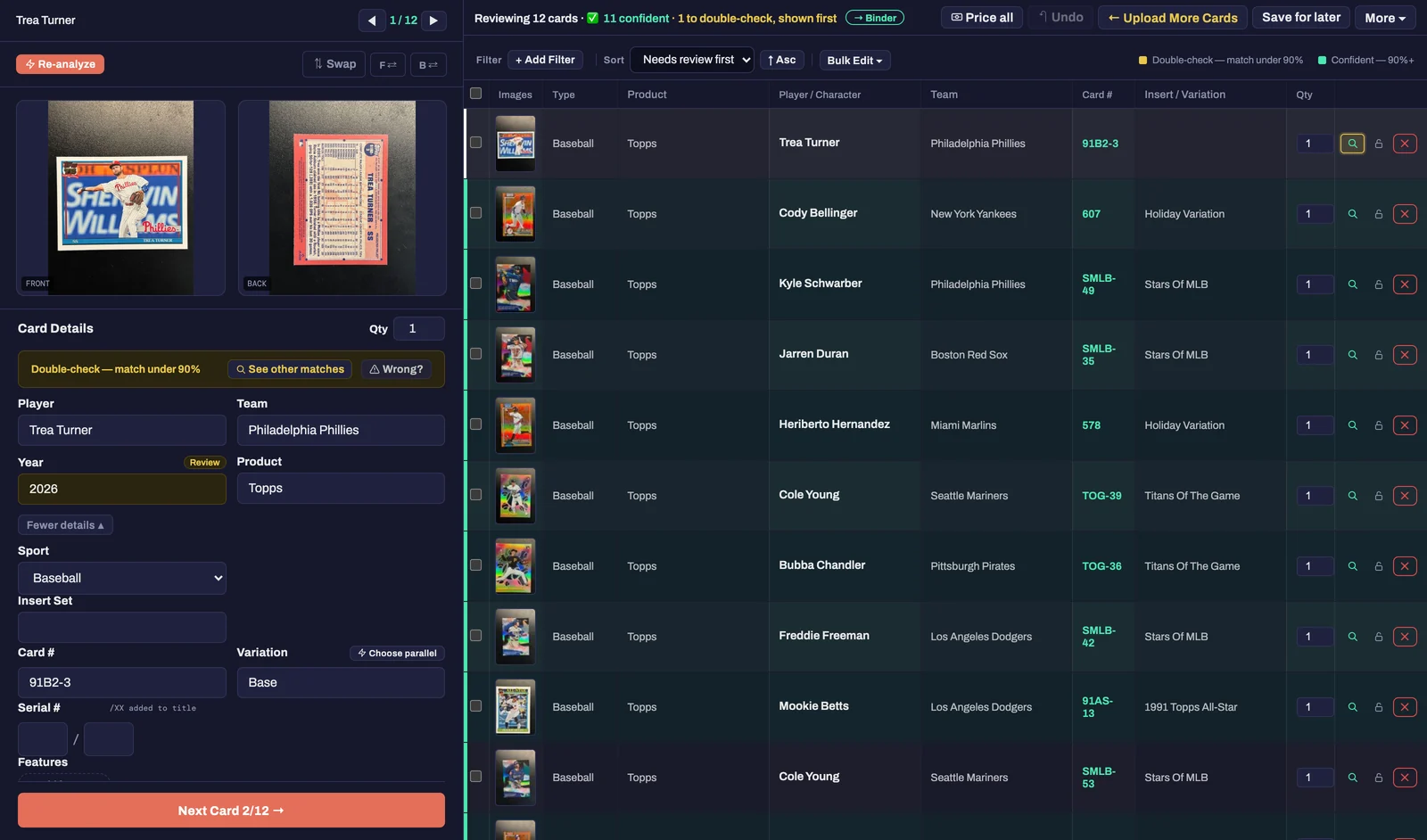
The review screen after a 12-card upload: 11 confident, 1 to double-check shown first, each row with player, team, card number and insert set read from the photos, and the flagged card open on the left

Reads the whole card

CardBinder pulls every detail: player, team, year, brand, set and more, from both the front and back. You can edit each field if we got it wrong.

Scan a stack at once

Upload an entire batch at once. Whether it's a folder of card photos from your phone or your computer, CardBinder can handle it.

Knows autos, relics and parallels

Autographs, memorabilia cards, serial numbers and parallels are all detected. If CardBinder finds a non-base card but can't confidently identify it, pick the right parallel from a list of matches.

Fix a match in two clicks

All fields are editable, but if CardBinder got too many details wrong, pick a new match from a list of cards that are already filtered. One click populates every field to the card you pick. If CardBinder got the parallel wrong, another click fixes that too.

Catches duplicates

Whether you scanned a card you've already uploaded or scanned the same card twice in one batch, CardBinder flags it immediately and lets you confirm whether you already have that card.

Upload cards straight from your phone

Have a stack of cards in front of you? You can either upload with our mobile app or straight to the desktop app with our upload by phone feature. Scanning a QR code opens your camera, and your photos go straight to the desktop app.
Value

Real prices, refreshed nightly.

Every card gets a market value from actual recent sales, not a guess, and it's re-checked while you sleep.

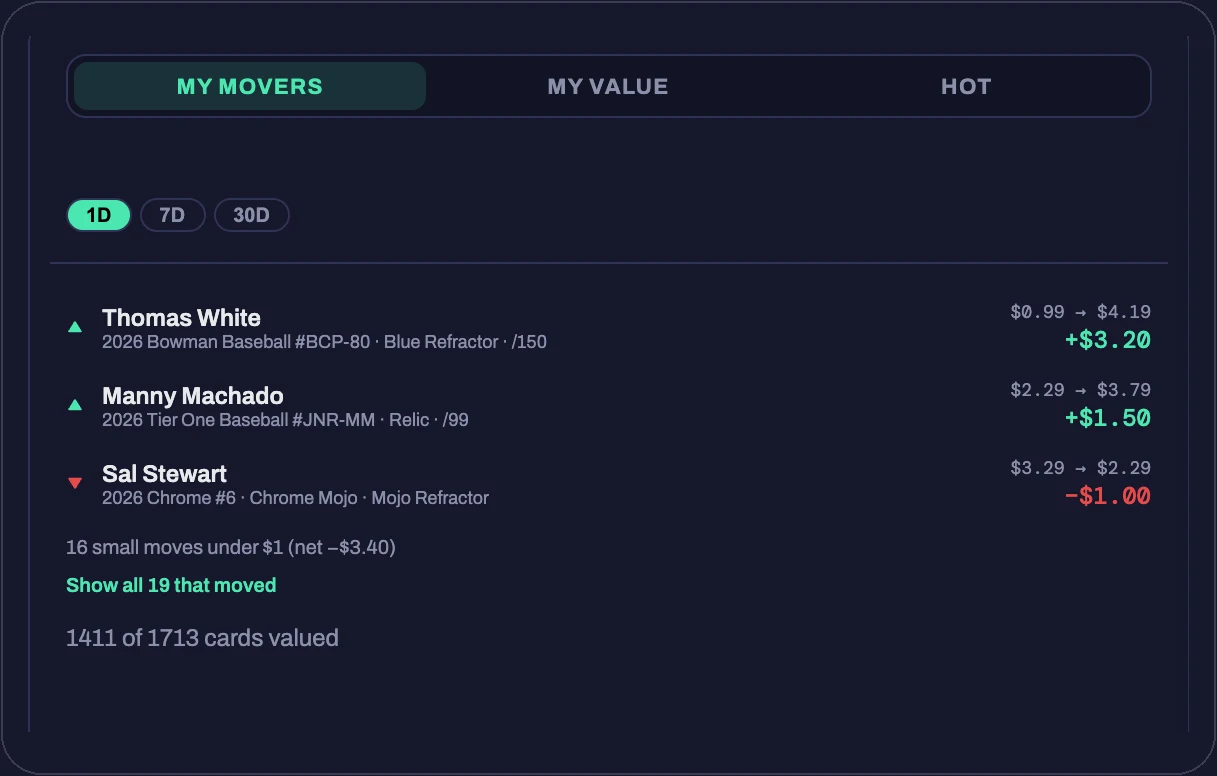
The binder cover's My Movers card: today's biggest movers, each with its price change from yesterday to today, and how many cards are valued so far

Priced from real sales

Values come from recent sold listings and a live market-value feed, matched to the exact parallel and serial number. A Yellow /75 is priced as a Yellow /75, not as the base card.

A value the moment you scan

The price shows up on the review screen while the batch is still uploading, before the card is even in your binder.

Refreshed every night

Your whole binder is re-priced overnight, with sanity checks so one odd sale doesn't swing a card, or your total, out of nowhere.

Binder Value and movers

One number for the whole collection, and the cards that moved it up or down since yesterday, right on the front page of your binder.

Get values on demand

Select any cards and hit Get values for a fresh look right now. Handy before a show, or after you fix a match.

Honest when it doesn't know

No recent sales for that exact card? CardBinder says so instead of inventing a number. You'll never total a binder on made-up values.

Organize

A binder and a spreadsheet. Same cards.

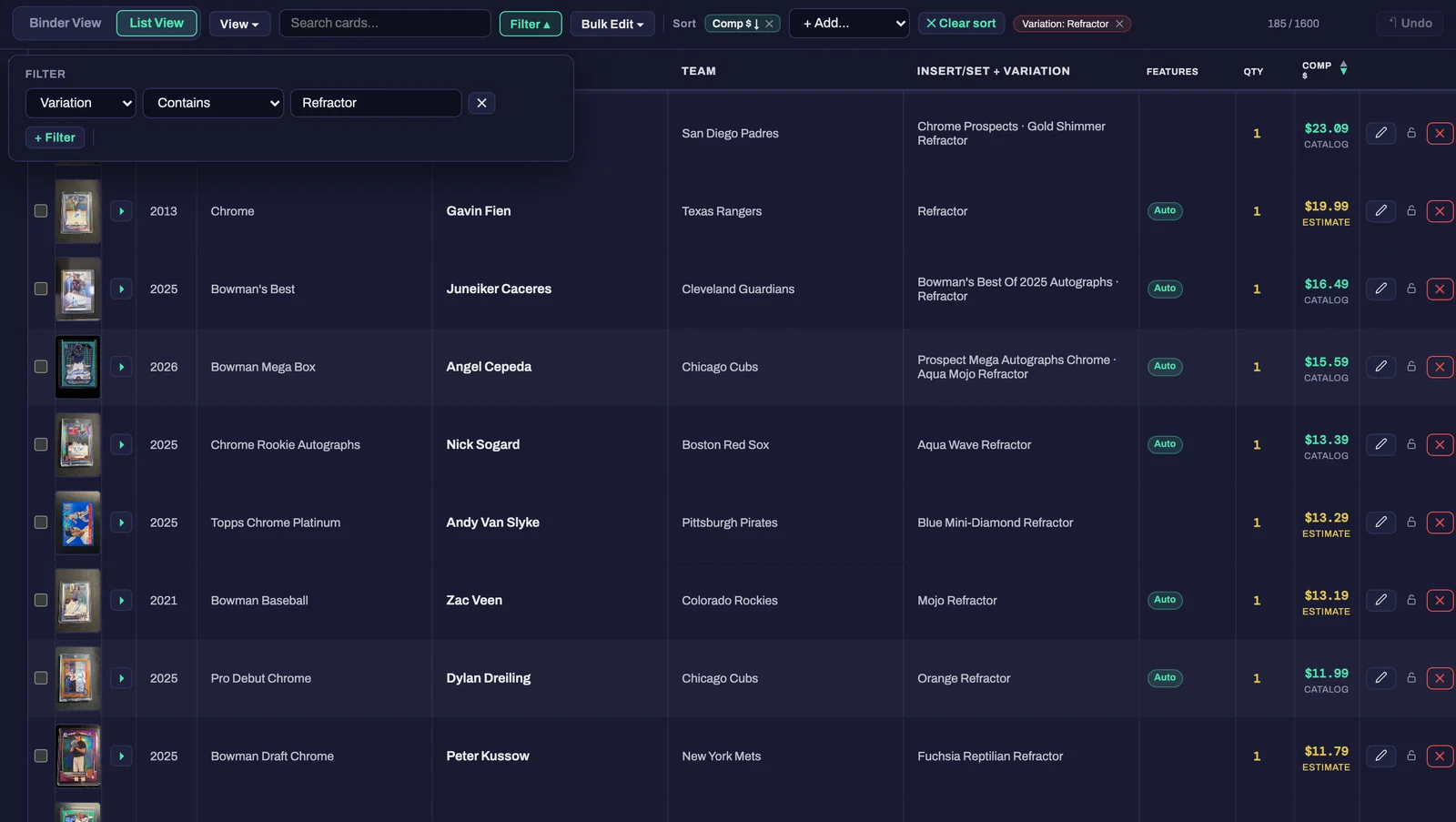
Flip through nine-pocket pages when you want to look, or switch to List View and work it like a spreadsheet when you want to get things done.

List View with the Filter panel open, showing Refractor cards sorted by value

The binder

Nine-pocket pages, a cover, and the front and back of every card. Feels like the one in your closet, minus the ring dents.

List View

Every field in a column. Pick which columns show, drag them into order, resize them, and it remembers next time.

Filter and sort anything

Contains, is blank, is not blank, on any column, stacked however you like. Instant as you type, even at 10,000 cards.

Bulk edit

Select a hundred cards and change a field on all of them in one move. Set, product, features, whatever's wrong on the whole stack.

Photos, forever

Front and back of every card, unlimited, on every plan including the free one. Replace a photo any time, zoom in on the corners.

Graded and raw, side by side

Grade and cert number on any card, a quantity for the ones you have five of, and a features list for autos, relics and patches.

Sell

Binder to eBay in one click.

Connect eBay once. After that, a listing is a button. And your personal collection stays out of it: every card lives in the binder, the marketplace, or both, your call.

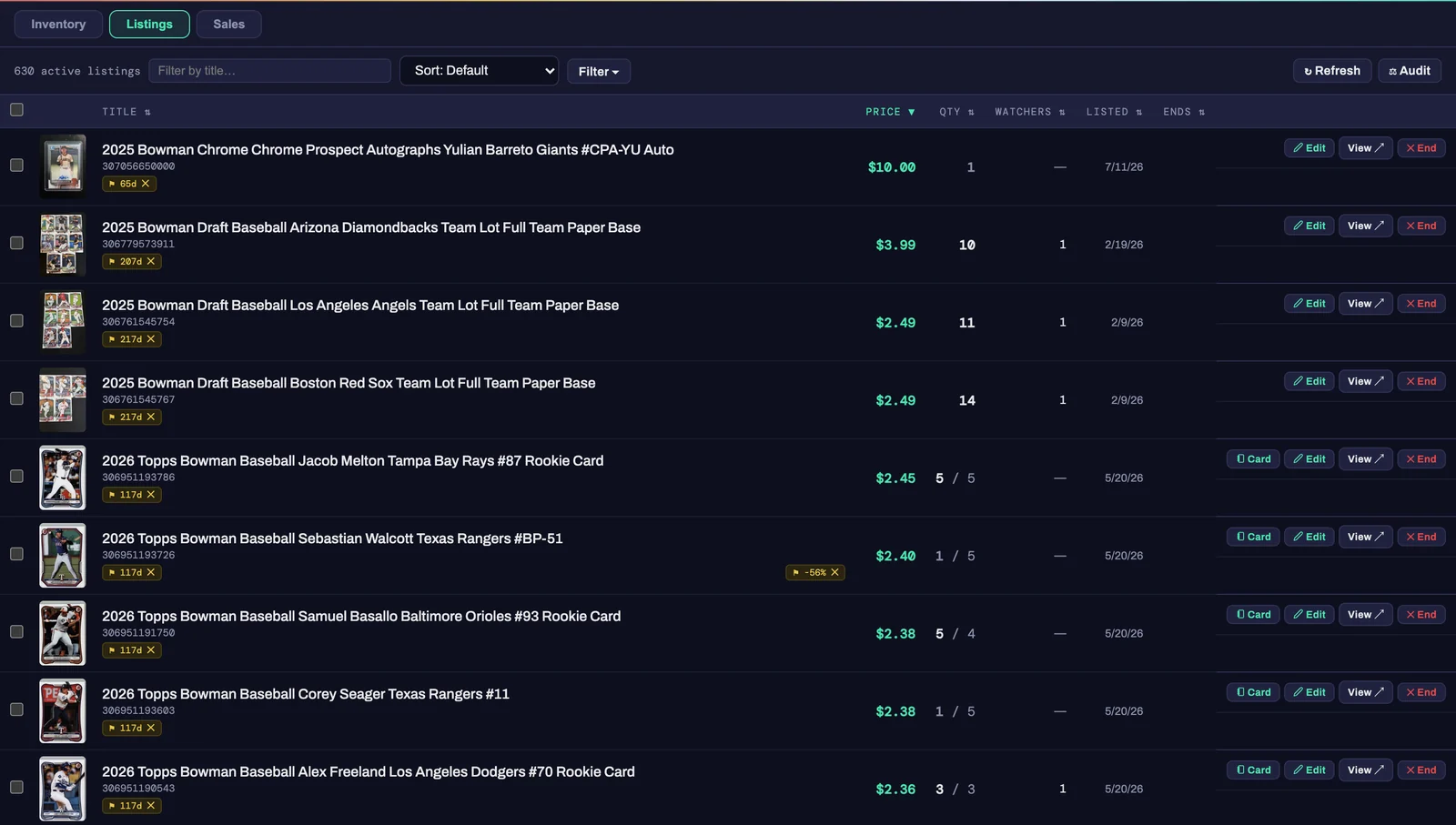
The Listings screen: 630 active eBay listings with price, quantity, watchers and end date

One-click listing

Title, description, price from comps, photos, category, shipping. CardBinder writes it and posts it. You approve.

Bulk list

Select fifty cards, hit List, walk away. Each one goes up as its own listing with its own price and photos.

Lots

Group cards into a single lot listing. When the lot sells, every card in it is marked sold and comes out of your inventory.

Sales sync, both ways

Sold on eBay? CardBinder marks it sold, drops the quantity, and logs the sale. Mark it sold in CardBinder and the eBay listing ends.

Your eBay store categories

Import the categories from your eBay store, or make new ones from inside CardBinder, and file each listing where you want it.

Edits flow through

Change a price or swap a photo in CardBinder and the live listing updates. Reprice a whole page of cards at once if the market moves.

Phone

Built for the card show table.

Everything above works on your phone, and the scanner was built for it first. Add CardBinder to your home screen and it opens like an app, nothing to install.

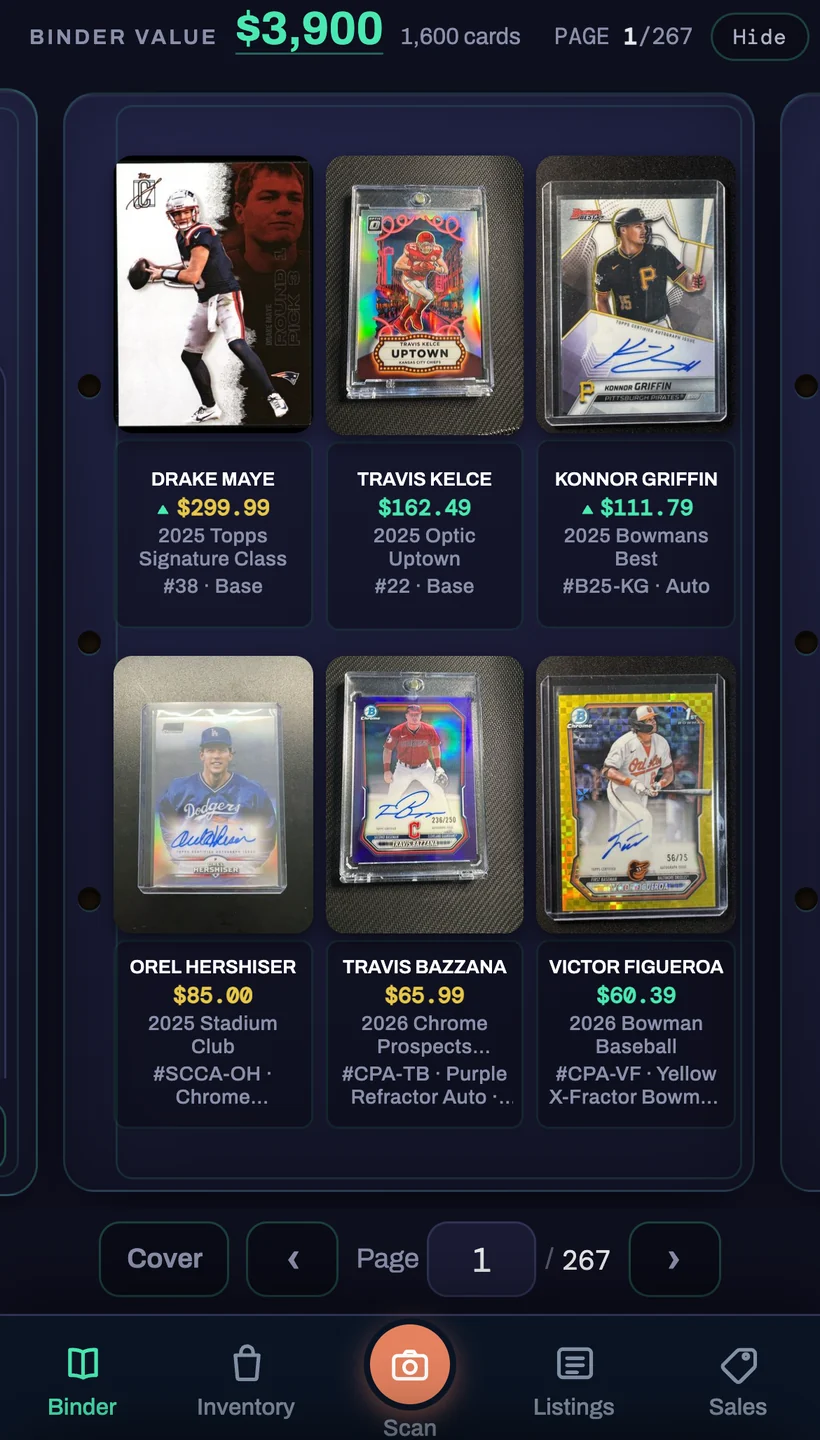
The phone binder: six pockets with a value on every card, page controls and the tab bar

Scan at the show

Phone camera, front and back, one card after the next. Review the batch at the table or on your laptop at home. Same binder, either way.

Your binder in your pocket

Flip the same pages, with value, year, product and parallel on every pocket, plus filter, sort and view controls sized for a thumb.

List from your phone

Select, list, done. The same one-click eBay flow, so a card you bought at the show can be up for sale before you leave the parking lot.

Shipping every week

Recently shipped

CardBinder is built by one collector who uses it every day. Here's what went live in the last week or so.

  • Sep 15Pick a different parallel and the card re-prices off that parallel, not the base.
  • Sep 14Edit a card's photo and your live eBay listing picks up the new one.
  • Sep 14Click the Features cell in List View to add autos, relics and patches right there.
  • Sep 14Column headers wrap instead of clipping, and dragging a divider only moves the two columns beside it.
  • Sep 12Duplicate upload? Compare the card you kept and the new scan side by side, then merge or split.
  • Sep 11Filtering is instant as you type, even on a 10,000-card binder.
  • Sep 11Import or create eBay store categories from inside CardBinder.
  • Sep 11Mark a card sold and CardBinder ends the eBay listing for you.
  • Sep 10Team names suggest as you type, your card's sport first.
  • Sep 9Values show up during upload, before the card is even in the binder.
  • Sep 9Add a batch to your binder, your marketplace, or both, right from the review screen.
Coming soon
  • iPhone app in the App Store. Same CardBinder, one tap from the home screen.
  • Price check. Point your phone at a card at the show and see what it's worth, without adding it to your binder.
  • Slab scanning. Read the cert off a graded slab's label and pull the grade in with it.
  • Pokémon and TCG catalog. Full set data for the card games, in the same binder as your sports cards.

No dates on purpose. When it's live, it moves to the list on the left.

Free to start

Try it on 25 cards.

The binder, cataloging, eBay listing and photo storage are free forever. Your first 25 AI scans are on us, no credit card.

Start free See pricing